Subprocess
11/17/2022
Final Project - Due 11:59pm 12/6/2022
Create an assignment, ideally related to your research.
The script resulting from the assignment should be a general purpose tool capable of taking different inputs. You are not required to decompose your assignment into different levels of partial credit (e.g. 70%, 80%, etc.) but you may find it useful to structure it that way for organizational purposes.
You may use any python packages as long as they can be installed with a package manager.
You are required to provide:
- A writeup with sufficient detail for a student to understand and implement the assignment.
- The python code to the solution.
- At least three usage examples
- commandlines with provided inputs and expected outputs
- An in-class presentation describing the assignment (8-10 minutes)
Make sure it is okay to publicly release the data.
Grading Rubric
Presentation
- Is the problem sufficiently motivated?
- Are relevant and informative visual aids used (avoid massive walls of text!)?
- Is the input and desired output clearly described?
- Is there an outline for how the code will work?
Writeup
- Is sufficient, but not excessive, background information provided?
- Is the task clearly described?
- Are the steps required to complete the task presented in a logical manner?
- Are there at least three examples, complete with commandline?
- Are the examples sufficient to demonstrate the task?
Code
- Does the code do what it is suppose to?
- Are gross inefficiencies avoided?
- Are appropriate data structures used?
- Are language features appropriately used?
Going Outside the (Python) Box
Sometimes you need to integrate with programs that don't have a python interface (or you think it would just be easier to use the command line interface).
Python has a versatile subprocess module for calling and interacting with other programs.
However, first the venerable system command:
The return value of the system command is the exit code (not what is printed to screen).
subprocess
The subprocess module replaces the following modules (so don't use them):
os.system
os.spawn*
os.popen*
popen2.*
commands.*
subprocess.call
Run the command described by ARGS. Wait for command to complete, then return the returncode attribute.
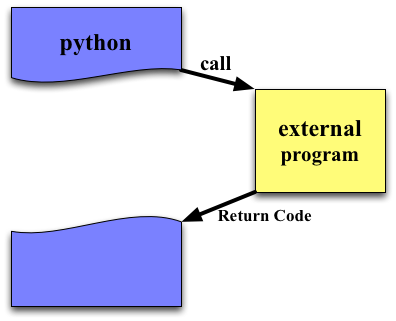
ARGS
ARGS specifies the command to call and its arguments. It can either be a string or a list of strings.
If shell=False (default) and args is a string, it must be only the name of the program (no arguments). If a list is provided, then the first element is the program name and the remaining elements are the arguments.
shell
If (and only if) shell = True then the string provided for args is parsed exactly as if you typed it on the commandline. This means you that:
- you must escape special characters (e.g. spaces in file names)
- you can use the wildcard '*' character to expand file names
- you can add IO redirection
If shell=False then list arguments must be use and they are passed literally to the program (e.g., it would get '*' for a file name).
shell is False by default for security reasons. Consider:
filename = input("What file would you like to display?\n")
What file would you like to display?
non_existent; rm -rf / #
subprocess.call("cat " + filename, shell=True) # Uh-oh. This will end badly...
By default /bin/sh is used as the shell. You are probably using bash. You can specify what shell to use with the executable argument.
shell Examples
Input/Output/Error
Every process (program) has standard places to write output and read input.
- stdin - standard input is usually from the keyboard
- stdout - standard output is usually buffered
- stderr - standard error is unbuffered (output immediately)
On the commandline, you can changes these places with IO redirection (<,>,|). For example:
    grep Congress cnn.html > congress
    wc < congress
    grep Congress cnn.html | wc
When calling external programs from scripts we'll usually want to provide input to the programs and read their output, so we'll have to change these 'places' as well.
stdin/stdout/stderr
stdin, stdout and stderr specify the executed program’s standard input, standard output and standard error file handles, respectively. Valid values are
subprocess.PIPE- this enables communication between your script and the program- an existing file object - e.g. created with
open - None - the program will default to the existing stdin/stdout/stderr
Do no use subprocess.PIPE with subprocess.call
Redirecting to files
subprocess.check_call
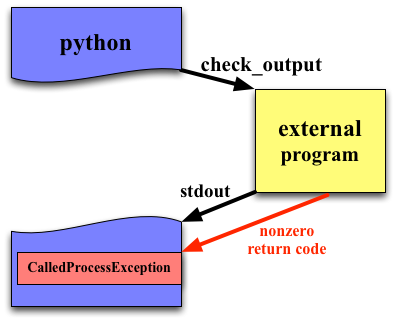
check_call is identical to call, but throws an exception when the called program has a nonzero return value.
subprocess.check_output
subprocess.check_output
Typically, you are calling a program because you want to parse its output. check_output provides the easiest way to do this. It's return value is what was written to stdout.
Nonzero return values result in a CalledProcessError exception (like check_call).
subprocess.check_output
Can redirect stderr to STDOUT
Why exit 0?
How can we communicate with the program we are launching?
Popen
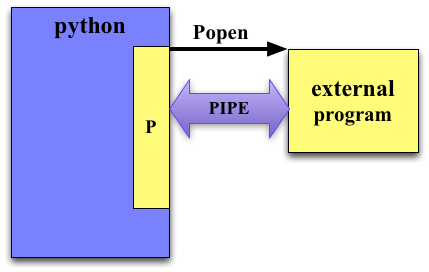
All the previous functions are just convenience wrappers around the Popen object.
Popen has quite a few optional arguments. Shown are just the most common.
cwd sets the working directory for the process (if None defaults to the current working directory of the python script).
env is a dictionary that can be used to define a new set of environment variables.
Popen is a constructor and returns a Popen object.
Popen
The python script does not wait for the called process to finish before returning.
We can finally use PIPE.
subprocess.PIPE
If we set stdin/stdout/stderr to subprocess.PIPE then they are available to read/write to in the resulting Popen object.
subprocess.PIPE
Pipes enable communication between your script and the called program.
If stdout/stdin/stderr is set to subprocess.PIPE then that input/output stream of the process is accessible through a file object in the returned object.
python3 strings are unicode, but most programs need byte strings
Unicode (aside)
Bytes strings (which were the default kinds of string in python2) store each character using a single byte (ASCII, like in the Martian).
Unicode uses 1 to 6 bytes per a character.
This allows supports for other languages and the all important emoji.
Converting bytes to string
Warning!
Managing simultaneous input and output is tricky and can easily lead to deadlocks.
For example, your script may be blocked waiting for output from the process which is blocked waiting for input.

Popen.communicate(input=None)
Interact with process: Send data to stdin. Read data from stdout and stderr, until end-of-file is reached. Wait for process to terminate.
input is a string of data to be provided to stdin (which must be set to PIPE).
Likewise, to receive stdout/stderr, they must be set to PIPE.
This will not deadlock.
99% of the time if you have to both provide input and read output of a subprocess, communicate will do what you need.
Interacting with Popen
Popen.poll()- check to see if process has terminatedPopen.wait()- wait for process to terminate Do not use PIPEPopen.terminate()- terminate the process (ask nicely)Popen.kill()- kill the process with extreme prejudice
Note that if your are generating a large amount of data, communicate, which buffers all the data in memory, may not be an option (instead just read from Popen.stdout).
If you need to PIPE both stdin and stdout and can't use communicate, be very careful about controlling how data is communicated.
Review
- Just want to run a command?
subprocess.call
- Want the output of the command?
subprocess.check_output
- Don't want to wait for command to finish?
subprocess.Popen
- Need to provide data through stdin?
subprocess.Popen,stdin=subprocess.PIPE,communicate
Exercise
We want to predict the binding affinity of a small molecule to a protein using the program smina.
Project
- Run the command
smina -r rec.pdb -l lig.pdb --minimizeon these files. Parse the affinity and RMSD and print them on one line. - Run the command
smina -r receptor.pdb -l ligs.sdf --minimize. Parse the affinities and RMSDS.- Plot histograms of both
- Plot a scatter plot


